
Journey mapping has become standard practice in product teams. But there's a dirty secret no one talks about:
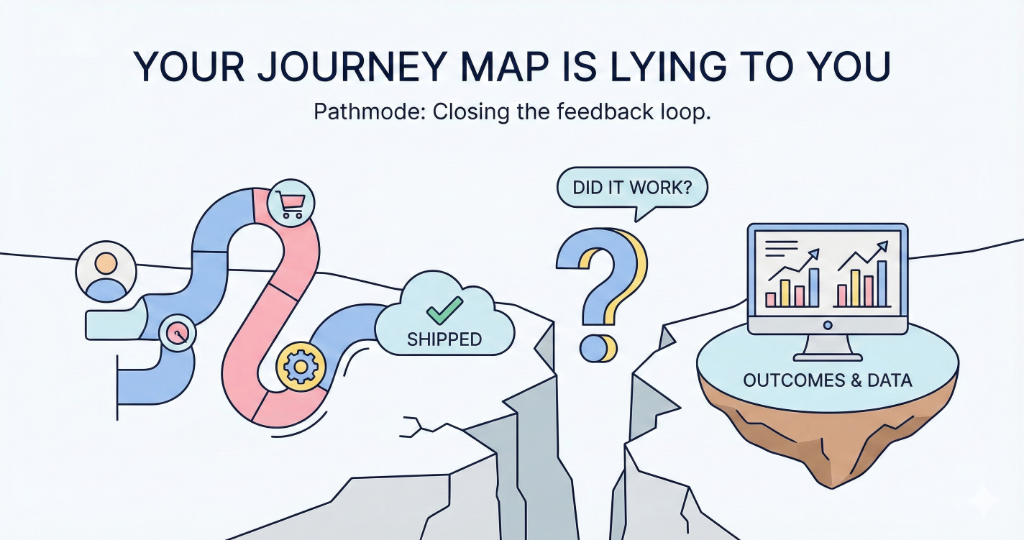
Journey maps are one-way streets.
Insights go in. Opportunities get identified. Features get built. And then... nothing. The map sits frozen in time, a monument to what we thought we knew six months ago.
Did shipping that feature actually improve the journey? Nobody knows. The map doesn't tell you. It was never designed to.
The Expensive Planning Trap
Most journey tools are built for planning. They help you visualize the current state, identify pain points, and generate feature ideas. This is valuable work.
But planning is only half the loop.
The other half—the half that almost no tool supports—is learning. Did the solution work? Did the pain point reduce? What actually happened after we shipped?
Without this feedback loop, we're not doing product development. We're doing product guessing. And guessing is expensive—because every feature you ship on top of an unverified foundation compounds the risk.
The Question Nobody Asks
There's a simple question that exposes this gap:
What feedback mechanisms exist to know if what you shipped actually worked?
For most teams, the honest answer is: a dashboard somewhere. Maybe a Mixpanel chart. Perhaps a quarterly business review where someone squints at a graph.
But here's the problem: those dashboards are disconnected from the original insight.
There's no direct line from "User struggles at checkout" to "We shipped one-click checkout" to "Checkout abandonment dropped 15%." The data exists in three different systems. The journey map knows nothing about what happened after you drew the sticky note.
The insight was born in the map. The outcome died in a spreadsheet.
Closing the Loop
We're building something different at Pathmode. We call it the Closed-Loop Journey Map.
Here's how it works:
1. Opportunities Become Experiments
Every opportunity on your journey map gets a structured hypothesis:
- If we simplify the checkout form...
- Then we expect conversion to increase by X%...
- Because users are abandoning due to address input friction.
This isn't just a sticky note. It's a testable claim with success criteria defined before you build.
2. Outcomes Surface Automatically
When a solution ships, the map doesn't just archive the opportunity. It connects the dots.
Linked metrics flow back to the journey step. You see the before and after. The map shows you—without asking—whether the pain point actually reduced.
No manual entry. No prompts. Just the truth, surfaced where it belongs: on the map itself.
3. The Journey Evolves
Over time, your journey map becomes a living history of what you tried and what worked. You can see:
- Which pain points are actually getting solved
- Which solutions failed despite high confidence
- Which areas of the journey are improving (or getting worse)
The map stops being a plan. It becomes a learning system.
Planning Mode vs. Learning Mode
The difference between these two modes is profound:
| Planning Mode | Learning Mode |
|---|---|
| "We think this is a problem" | "We validated this is a problem" |
| "We shipped a fix" | "We shipped a fix and measured impact" |
| "On to the next thing" | "Let's see if it worked before moving on" |
| Builds on assumptions | Builds on evidence |
Most product teams are stuck in Planning Mode. They ship fast, but they don't learn fast. They make the same types of mistakes repeatedly because the feedback never flows back to the source.
Worse: they keep building on top of unverified foundations, compounding the cost of every wrong assumption.
Stop Planning. Start Learning.
The era of the static journey map is ending. It was a useful artifact for alignment meetings and stakeholder decks. But it was never designed to help you build better products over time.
The future belongs to teams that close the loop. That measure what they ship. That update their understanding based on reality, not just assumptions.
A journey map that can't tell you whether your last fix worked is just a pretty picture of last quarter's problems.
Don't Just Write Code. Define Intent.
Turn user friction into structured Intent Specs that drive your AI agents.
Get Started for Free