
Every spec I've ever written started decaying the moment I hit save.
Not because the spec was bad. Because the world kept moving. New user feedback came in. The team shipped something slightly different from what was planned. Nobody went back to check whether the outcomes were actually met. The spec sat in a doc, technically correct at the time of writing, increasingly fictional as weeks passed.
This is the default state of product specifications. They're snapshots. And snapshots lie — not because they were wrong when taken, but because they pretend to be current when they're not.
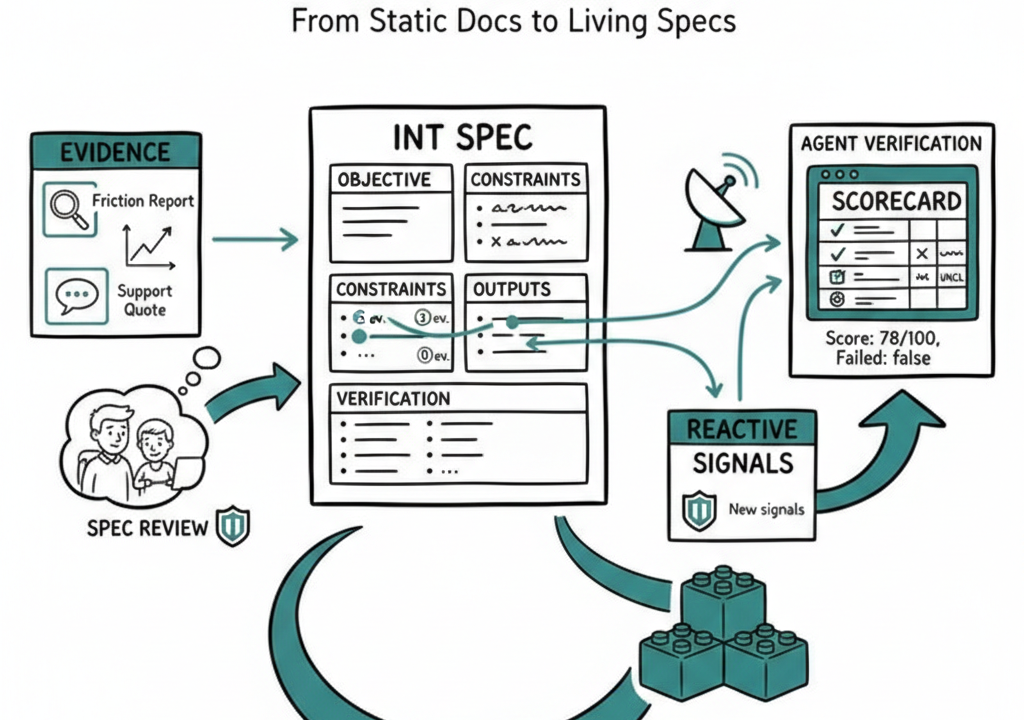
We spent the last month making specs in Pathmode do something specs don't normally do: stay honest. Here's what that looks like, walked through a single spec from evidence to verification.
The Spec: Dashboard Performance
Let's follow a real example. A team collects three pieces of evidence:
- A friction report: "Dashboard takes 4+ seconds to load, users abandon before data appears"
- A metric: p95 load time is 4.2 seconds, trending worse over 6 weeks
- A support quote: "I open the dashboard, go make coffee, and hope it's loaded when I get back"
From this evidence, they write an intent spec with a clear objective, measurable outcomes, constraints, and edge cases. Standard stuff. The spec gets approved and enters the build queue.
Here's where it used to end. The spec existed. The team shipped something. Maybe it matched the spec. Maybe it didn't. Nobody checked systematically.
Now, four things happen differently.
1. Evidence Anchors — Know Why Each Line Exists
The spec doesn't just list outcomes. Each outcome links back to the specific evidence that justifies it.
"Dashboard p95 load time under 1.5s" isn't an arbitrary target. It's anchored to the metric evidence showing 4.2s and the friction report describing user abandonment. "Skeleton UI renders within 200ms" traces to the support quote about making coffee.
This sounds like metadata. It's actually accountability. When someone asks "why 1.5 seconds and not 2?" the answer isn't "the PM felt like it." The answer is three clicks away: the evidence item, the user's words, the severity rating.
Evidence anchors work at the section level. Outcomes, edge cases, constraints — each can reference the specific observations, quotes, or metrics that drove that requirement. When you're reviewing a spec six weeks later, you can see whether the evidence still holds or whether the world has moved on.
2. Spec Review — See Assumptions, Not Just Requirements
The spec gets shared for review with stakeholders who weren't in the room when it was written. A designer. A senior engineer. A customer success lead.
What they see isn't a flat document. Each outcome shows a small badge: "3 ev." means three evidence items back this outcome. "0 ev." means this outcome is an assumption — nobody has evidence for it yet.
This changes the review conversation. Instead of debating whether an outcome sounds right, reviewers can see which parts of the spec are grounded and which are guesses. The designer might say: "The skeleton UI outcome has no evidence. Has anyone actually tested whether perceived load time matters more than actual load time?" That's a better question than "looks good to me."
Health metrics are visible. Problem severity is visible. The review page works on mobile with proper touch targets because reviews happen on phones, in transit, between meetings.
3. Reactive Signals — The Spec Notices New Evidence
Two weeks after the spec is approved, a new support ticket arrives: "Dashboard crashes on Safari when analytics widget has no data." The support team logs it as evidence — a friction item with critical severity.
In the old world, this evidence sits in the evidence board. Maybe someone notices it's related to the dashboard spec. Maybe they don't.
Now, the moment that evidence is created, Pathmode automatically matches it against approved and validated intents. Keyword overlap between "dashboard" and "analytics widget" in the evidence and the spec's outcomes triggers a signal: "New evidence may be relevant to Dashboard Performance."
The signal appears in the Signals view with two buttons: Link (to connect the evidence to the spec) and Dismiss (if it's a false match). The sidebar shows a badge count so the team knows there's something to look at.
This is the part that makes specs feel alive. They don't just sit there. They react when new information arrives that might change what they say.
4. Agent Verification — The Spec Grades Its Own Implementation
The team ships the fix. The engineer marks the spec as "shipped" and clicks "Verify with AI."
A text box asks: what did you implement? The engineer pastes a summary — or the latest implementation notes auto-fill from the activity log. Gemini 2.5 Flash reads the spec and grades the implementation against every outcome, constraint, constitution rule, and edge case.
The result comes back as a scorecard:
- Outcomes (3/4 pass): Load time target met. Parallelized API calls confirmed. Skeleton UI confirmed. But "no regression in data accuracy" is marked unclear — the summary didn't mention accuracy testing.
- Constraints (2/2 pass): Data model unchanged. SWR compatibility maintained.
- Edge Cases (2/3 pass): Zero-data accounts handled. Partial data degradation works. But time-range selector re-render wasn't addressed.
- Score: 78/100. Failed: false (no hard failures, but unclear items lower the score).
The team can see exactly what was missed. The time-range re-render edge case needs attention. The data accuracy outcome needs explicit confirmation. These aren't vague "we should probably check" items. They're specific, traceable gaps between what was specified and what was shipped.
If verification had failed — say the load time constraint was violated — a signal would automatically appear in the Signals view: "Verification failed for Dashboard Performance (42/100)." The team sees it alongside their other signals without having to remember to check.
The Loop
Here's what actually changed. Not four features. One loop.
Evidence feeds specs. Specs get reviewed with evidence visible. New evidence triggers signals against existing specs. Shipped code gets graded against the spec. Failures create new signals. Signals surface evidence gaps. The loop continues.
A static spec is a bet placed once. A living spec is a bet that updates itself as new information arrives, that tells you when the ground has shifted, and that checks whether reality matched the plan.
The gap in most product workflows isn't writing specs. Teams write specs constantly. The gap is what happens after. Does the spec stay current? Does anyone check whether what shipped matches what was planned? Does new evidence reach the people who need to see it?
Most tools treat specs as the output. We think they're the beginning of a feedback loop. Evidence in, spec out, implementation graded, gaps surfaced, evidence updated. That's not a document. That's a system.
If you want to try this: start with the Intent Compiler. Or if you're already building with Pathmode, the four features from this post are live now. Your specs just got a pulse.
Don't Just Write Code. Define Intent.
Turn user friction into structured Intent Specs that drive your AI agents.
Get Started for Free